TrueNAS vs Unraid comes down to how you want your drives stored and what you plan to run on them. TrueNAS Community Edition is free and built entirely around ZFS, and if ZFS is your goal, it’s the one I’d recommend. Unraid is paid, lets you mix drive sizes and add drives over time, and in my opinion, configuring a VM is a little more user-friendly.
Both are great, and I’d classify them as 1A and 1B for DIY NAS operating systems. I’ve switched everything over to TrueNAS, including the UGREEN DXP8800 Plus I use as an offsite backup (for ZFS replication), and I ran Unraid on the LincStation S1 when I reviewed it in March 2025.
Disclosure: Some links below are affiliate links, which means that I earn a percentage of each sale at no cost to you. Thank you for your support.
How Does Unraid Work and What Is It?
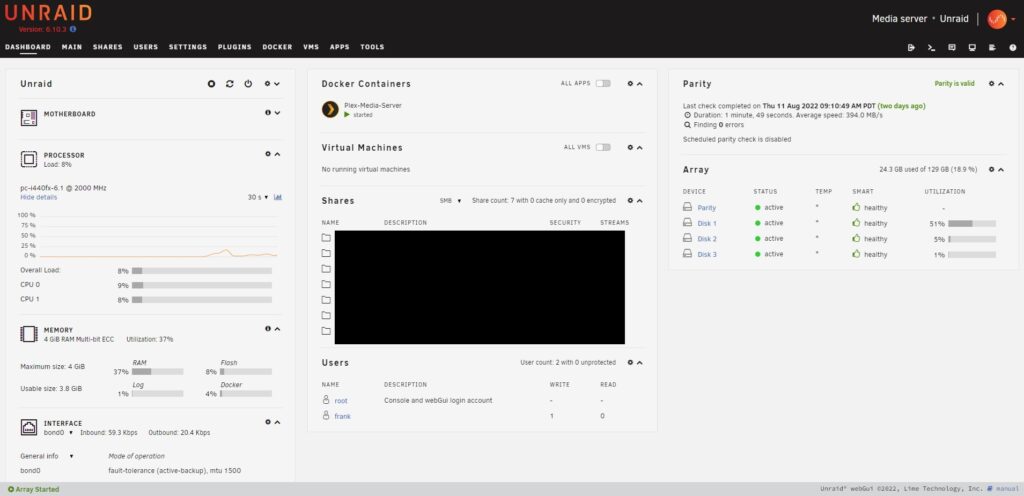
Unraid is a NAS operating system that runs on nearly any 64-bit x86_64 system with a minimal memory footprint. It manages shared folders, runs Docker containers from its apps page, and can create virtual machines.
What makes Unraid different is the array. It is not RAID, as each file is written whole to one disk and one or two parity drives protect the rest (with two, two drives can fail without data loss). That’s why you can mix drive sizes and add drives over time, as long as the parity drive is at least as large as the largest drive. It also means a pulled drive can be read on its own, idle disks can spin down, and a single file can’t be larger than one disk.
Since Unraid 7.3 (May 2026), it can boot from an SSD instead of being USB-only. Both operating systems also run on a prebuilt NAS, not only a DIY build. A UGREEN NAS lets you switch over to either one, and I was able to get TrueNAS set up on one in literally 5 minutes.
What Is TrueNAS and How Does It Work?
TrueNAS is a NAS operating system built on OpenZFS. It used to come in two versions: TrueNAS CORE (formerly FreeNAS), based on FreeBSD, and TrueNAS Scale, based on Debian Linux. TrueNAS Scale was renamed TrueNAS Community Edition in 25.04 (April 2025), and CORE is now listed as TrueNAS CORE (Legacy), in maintenance mode with vulnerability patches only and no new features. For a new install, Community Edition is the only real option (my TrueNAS CORE vs TrueNAS Scale (Community Edition) comparison covers moving off CORE).
That means an older Unraid vs FreeNAS comparison is about TrueNAS CORE (Legacy), and an Unraid vs TrueNAS Scale one is about Community Edition. Community Edition is a free download, and as of October 2026, the recommended release is 25.10 (Goldeye).
The draw of TrueNAS is ZFS itself: scrubs, snapshots and replication, all built in, and I use snapshot replication for all of my backups. However, it’s more of a power user NAS operating system. Picking a pool layout (RAIDZ1, mirrors, RAIDZ2 or RAIDZ3) is confusing the first time, and ACLs and permissions are just more confusing.
Unraid vs TrueNAS: Key Feature Differences
The biggest difference between Unraid and TrueNAS is the storage model. Unraid’s array writes each file whole to one disk and protects it with parity, while TrueNAS spreads data across the drives in a ZFS pool. Snapshots, write speed and how you add drives all follow from that.
File Systems
Unraid formats drives as XFS, BTRFS or ZFS. ZFS pools have been supported since Unraid 6.12 (2023), a ZFS disk can also sit inside the parity array, and ReiserFS can no longer be selected as of Unraid 7.0. TrueNAS uses ZFS only, so the first question is whether you want ZFS (my Btrfs vs ZFS comparison covers what each one gives you).

ZFS on TrueNAS is very different. Most people build a pool from RAIDZ1 (one drive can fail) or RAIDZ2 (two can fail), and the drives in a vdev should match, so you can’t throw a random mix of drives at it. Since TrueNAS 24.10, a RAIDZ vdev can be extended one disk at a time (see adding a disk to an existing pool in TrueNAS), but it’s still less flexible than an Unraid array.

Write Performance
The array design is also why Unraid tends to be slower over the network. With Unraid, you have to look at it like you’re writing your data directly to one hard drive, and then there are the parity calculations. Without caching, you get at best the performance of one individual drive, which is worse than either RAID or a ZFS pool. A cache pool (or a ZFS pool inside Unraid) helps a lot, but an Unraid array on its own won’t make much use of 10GbE.
Data Management
Day to day, both are extremely similar. You create shared folders that are accessed over SMB or NFS, and the end result is the same on both, right down to backing up to Unraid with Time Machine and backing up to TrueNAS with Time Machine.
Snapshots are where they differ. A snapshot freezes a dataset at a point in time so you can recover from deleted files, corruption or ransomware, and TrueNAS has them built in through ZFS.

Unraid supports snapshots on BTRFS and ZFS (a pool or a ZFS array disk), but not on XFS. If you plan on using XFS with Unraid, you won’t have snapshots.

Application Support
Unraid installs applications from its apps page, where you can search for just about anything (a media server like Plex is the classic example), and they’re generally Docker containers.

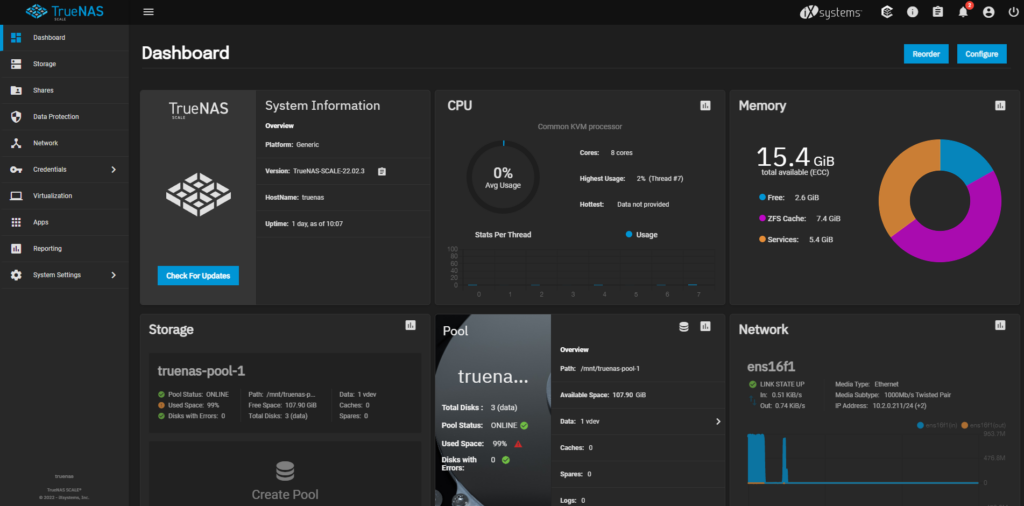
TrueNAS Community Edition has a full app section that runs Docker containers. Apps moved from Kubernetes to Docker in 24.10 (Electric Eel), and custom apps can be added with a wizard or Compose YAML.

TrueNAS CORE used plugins installed in jails instead. That only matters if you still run a CORE box, since CORE is Legacy now.

Both run virtual machines, and you’ll get them running on either one, but configuring a VM inside of Unraid is easier than it is in TrueNAS.
Cost and Licensing
TrueNAS Community Edition is free. Unraid needs a paid license, sold in three tiers (as of October 2026), and on the two cheaper ones, you pay again each year if you want updates to keep coming:
- Starter: up to six attached storage devices (parity and cache drives included) and a year of updates.
- Unleashed: unlimited devices and a year of updates.
- Lifetime: unlimited devices and updates for the life of the product, the most expensive of the three.
A USB boot drive doesn’t count toward the limit, but an SSD boot drive does. Without the yearly extension, you keep your version indefinitely, but it stops getting patches and bug fixes once that version reaches end of life. There’s also a 30-day free trial that doesn’t need a card.
Compatibility & Requirements
TrueNAS lists a minimum of any x86_64 CPU, 8 GB of memory, a 20 GB SSD boot device and two identically sized drives. 8 GB will work, but I’d go with 16 GB if you can, as ZFS uses extra memory as ARC (its read cache). Unraid itself needs very little memory, but for VMs, its docs list 8 GB as the minimum (16 GB or more recommended) and a four-core 2.4 GHz CPU with hardware virtualization (HVM).

ECC memory is the point that gets debated most. ECC detects and corrects memory errors, and TrueNAS’s hardware guide says it virtually eliminates any chance of RAM errors reaching the drives, so many people view it as required for ZFS. It is not a requirement, though, and ECC helps every file system, not only ZFS. The UGREEN DXP8800 Plus I put TrueNAS on doesn’t support ECC at all (its Core i5-1235U can’t use it), so it’s worth weighing, but it isn’t something TrueNAS forces on you.
Differences Between Unraid and TrueNAS
Here’s how they compare side by side (as of October 2026):
| Feature | Unraid | TrueNAS Community Edition |
|---|---|---|
| File system | XFS, BTRFS or ZFS | ZFS only |
| Data protection | Up to two parity drives | RAIDZ1/2/3 or mirrors |
| Mixing drive sizes | Yes, add drives over time | Matching drives per vdev; RAIDZ expands one disk at a time since 24.10 |
| Snapshots | BTRFS and ZFS only | Built in |
| Array write speed | One drive at best without cache | Spread across the pool’s drives |
| Apps | Docker, from the apps page | Docker since 24.10, plus Compose YAML |
| VMs | Supported, easier to configure | Supported |
| Cost | Paid license, three tiers | Free |
| Learning curve | Easier for beginners | More of a power user OS |
Unraid or TrueNAS: Which Should You Choose?
Whether you pick TrueNAS or Unraid, the core functionality is extremely similar, so you’ll be happy with either for file sharing and apps. If ZFS and matching drives are the plan, pick TrueNAS, and if you’re mixing drive sizes or VMs matter most, pick Unraid.
- Choose TrueNAS if data integrity and ZFS come first, you’re buying matching drives, you’d rather not pay for a license, and you don’t mind spending time learning it.
- Choose Unraid if you have a mix of drive sizes to use and grow over time, VMs are a big part of the plan, or you want fewer learning hurdles and you’re open to doing things the Unraid way.
If Synology or Proxmox is also on your list, my Unraid vs. Synology and Proxmox vs. Unraid comparisons cover those. If you’re a beginner, Unraid, in my opinion, is going to be a little easier. If ZFS is your goal, I’d recommend TrueNAS. It doesn’t mean you can’t do it in Unraid, I just find the experience a little bit easier in TrueNAS, and it’s what I run myself.