I’ve run cameras into Surveillance Station for years, and the advice on this page has genuinely changed in 2026. Not because the cameras got better, but because Synology changed the licensing on its own cameras partway through the year, and the change is easy to walk straight into if you buy the model that looks newer.
Most articles on this topic compare sensors and call it done, but the sensor is the easy part. What actually decides the total cost of a Surveillance Station build is licensing, because every camera past your first two costs you a licence on top of the camera, and some Synology cameras include that licence while others no longer do.
Disclosure: Some links below are affiliate links, which means that I earn a percentage of each sale at no cost to you. Thank you for your support.
Best Cameras for Synology Surveillance Station: My Quick Picks
- Best overall past your first two cameras: the Synology BC500. It includes the device licence, which makes it cheaper in practice than the third-party cameras below despite a higher sticker price.
- Best image quality: EmpireTech IPC-Color4K-T. Genuinely better in low light than anything Synology sells, and you pay a licence for the privilege.
- Best all-rounder: EmpireTech IPC-T5442T-ZE, with a varifocal lens that saves you guessing the field of view before it arrives.
- Best budget option: ANNKE FCD600. Cheap enough that it still wins on total cost even after adding a licence.
- Avoid, for Surveillance Station: the newer Synology BC510 and TC510. Same hardware as the 500 series, but the bundled licence is gone.
The Licence Rule That Decides This
Surveillance Station is licensed per device rather than sold outright. A Synology NAS ships with two device licences included, a dedicated NVR unit comes with four, and the deep learning NVRs come with eight. Your first two cameras are therefore free to connect, and every camera after that needs a licence you buy separately.
Synology sells those licences in packs of one, four and eight. A single device licence runs about $75, and the four-pack works out closer to $58 per camera. They’re permanent rather than subscriptions, which is the one genuinely good thing about the arrangement.
That figure is why the camera comparison everyone else publishes is misleading. A $230 camera that consumes a licence costs you $305 in reality, and a $245 camera that includes one costs $245. Once you’re past your first two cameras, the sticker price stops being the number that matters.
Which Synology Cameras Include a Licence (and Which No Longer Do)
I’d read this part twice, because it changed recently and it’s genuinely counterintuitive. Synology’s own cameras used to be a straightforward proposition: you paid a bit more than an equivalent third-party camera, and in exchange the device licence was built in. Synology’s own wording at launch was that its cameras “do not require the purchase or activation of Surveillance Station device licenses.”
That’s no longer true across the range. The models released since late 2025 have quietly dropped the bundled licence:
| Camera | Released | Licence included? |
|---|---|---|
| BC500 (bullet) | 2023 | Yes, no licence needed |
| TC500 (turret) | 2023 | Yes, no licence needed |
| CC400W (indoor, Wi-Fi) | 2024 | Yes, no licence needed |
| BC800Z | Nov 2025 | No, needs a licence |
| BC510 / TC510 | May 2026 | No, needs a licence |
The 510 series is the trap. It replaced the 500 series and the hardware is identical: same 2880×1620 sensor, same IP66 and IP67 ratings, same 30 metre night vision, same physical design. What the 510 adds is ONVIF support so it works with third-party recorders, and what it removes is the built-in licence. If you’re buying for Surveillance Station specifically, the older 500 series is the better purchase, which isn’t a sentence I expected to write.
I do want to be clear about the trade-off rather than treat it as a scandal. The 510’s ONVIF support is a real feature if you ever move off Surveillance Station, and it’s the reason those cameras also work with the Blue Iris alternatives I’d recommend. Synology has effectively swapped a bundled licence for portability, which is a fair trade if you might move platforms and a straight price increase for anyone staying on Surveillance Station.
Synology BC500: The One I’d Buy for Camera Three Onwards
The BC500 is a 5MP bullet camera at 2880×1620, IP67 rated, with 30 metres of night vision and on-camera people and vehicle detection, and it sits around $245 with the licence included.
I would run the arithmetic against the third-party options below, because the picture is clear. The EmpireTech turrets land around $230 before a licence and about $305 after one, against $245 all in for the BC500. You’re paying less for the Synology camera in real terms while also getting the integration that comes with a first-party device, which means detection settings and firmware updates handled inside Surveillance Station rather than through a separate web interface.
The honest limitation is image quality, because a 5MP Synology camera isn’t going to match a 4K EmpireTech with a larger sensor in poor light. If a specific position genuinely needs the best low-light image you can get, that’s worth paying the licence for. The TC500 is the turret version of the same camera with the same licensing, and it’s the shape most people prefer under an eave, though Amazon stock on it has been unreliable since the 510 replaced it.
Third-Party Cameras: When They Still Make Sense
I see two situations where they win. Either you are still inside your two free licences, in which case the licence cost is zero and you should simply buy the best camera for the money, or you need image quality Synology doesn’t offer and you’ve accepted the licence as part of the price.
EmpireTech IPC-Color4K-T
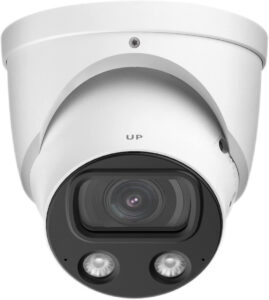
The best image on this page. It’s a 4K full-colour camera with a large sensor built specifically for low light, and it produces usable colour footage at night where most cameras have long since dropped to black and white. At around $315 before a licence, I’d buy it for the one or two positions where identifying a face actually matters, and put something cheaper everywhere else. There’s a bullet version if the turret shape doesn’t suit the mounting point.
EmpireTech IPC-T5442T-ZE
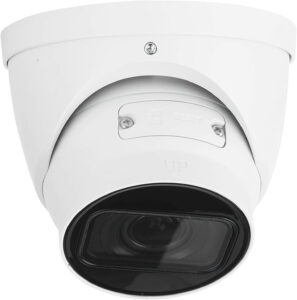
The IPC-T5442T-ZE is a 4MP turret with a motorised varifocal lens, and that lens is the reason to pick it. You can adjust the zoom and field of view after mounting instead of committing to a fixed angle you guessed at from the ground, and it runs around $230. If you’re covering a driveway or a long garden where you don’t know the framing yet, start here.
Loryta IPC-T5442TM-AS
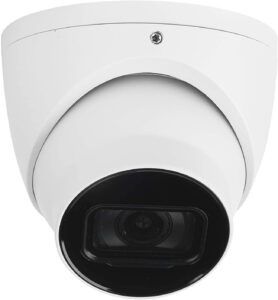
The Loryta IPC-T5442TM-AS is the fixed-lens sibling of the camera above, and it’s the one I’d pick when the framing is obvious and the varifocal lens would be wasted, since it’s the same 4MP sensor and the same night performance for less money. Whichever of these you mount outside, a junction box is worth the twenty dollars for hiding the cabling and keeping water out of the connector.
ANNKE FCD600
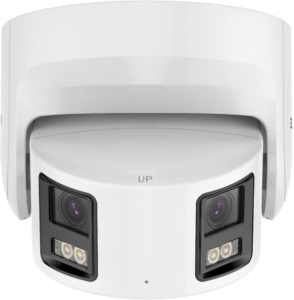
The ANNKE FCD600 is the exception to everything above. At roughly $77 it’s cheap enough that even after adding a $75 licence it still costs less than a BC500, so the licence argument doesn’t rescue Synology at this end of the market. The image is a step down from the EmpireTech cameras and it’s the right answer for covering a side gate or a shed where you want a record rather than an identification.
Which Cameras Are Actually Compatible with Surveillance Station?
This trips people up more than the licensing does, so it is worth stating plainly: Surveillance Station is not limited to Synology cameras. It supports thousands of models across most major brands, and anything that speaks ONVIF will generally connect even if it isn’t on the list by name.
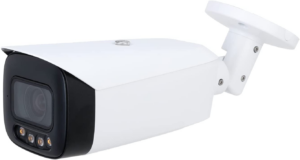
I would flag two practical caveats though. Being connectable isn’t the same as being fully supported, and a camera added over generic ONVIF will sometimes give you the video stream while quietly not exposing motion regions, audio, or the on-camera detection settings. Before buying anything not listed above, check it against Synology’s own compatibility list rather than trusting a retailer’s description.
The second is that every camera here is a wired PoE camera, and that is deliberate. Battery and Wi-Fi cameras from the big consumer brands are mostly built to work with their own cloud apps, and the ones that do speak ONVIF often do it badly. A PoE camera gives you one cable for power and data, no batteries to replace, and a stream that Surveillance Station can record continuously.
What I Would Avoid
- The BC510 and TC510, if you’re on Surveillance Station. Identical hardware to the 500 series without the bundled licence. Buy them only if the ONVIF support genuinely matters to you.
- Cloud-first consumer cameras. Ring, Nest and similar are built around a subscription and their own app, and they’re not the tool for a locally recorded system.
- Buying licences before you need them. Your first two are already included, so don’t add a licence pack to the cart until you’re actually connecting a third camera.
- Skipping the storage question. Continuous recording is hard on drives and a desktop drive won’t survive it, so I’ve covered which drives to use separately.
Which Camera Should You Buy?
For your first two cameras I would buy on image quality alone, because the licences are already included and the money is better spent on the sensor. That means an EmpireTech IPC-T5442T-ZE for most positions, or the Color4K-T where night colour genuinely matters.
From the third camera onward, the Synology BC500 becomes the sensible default, because the included licence makes it cheaper in real terms than the alternatives and the integration is tidier. Just make sure you are buying the 500 rather than the 510, since they look near enough identical and only one of them saves you the licence.
And whatever you put on the walls, remember that a camera system is only as private as the network it sits on. I would keep cameras on their own VLAN with no internet access unless something genuinely requires it, and treat the recordings as data worth protecting rather than a folder you never look at. Security guidance changes constantly and nothing is ever guaranteed, so this is worth revisiting rather than setting once and forgetting.