When you configure a VPN, one of the biggest decisions is whether it should be a split tunnel or a full tunnel. The difference is simple, but it changes how the VPN behaves in a big way.
With a split tunnel VPN, only specific traffic goes through the VPN tunnel. With a full tunnel VPN, all traffic goes through the VPN tunnel.
If you just want to access devices on your home or business network remotely, I would usually use a split tunnel VPN. If you are on an untrusted network like hotel Wi-Fi, airport Wi-Fi, or public Wi-Fi and want all traffic protected through your VPN server, I would use a full tunnel VPN.
In a perfect world, I like having both available. Use split tunnel when you only need access to internal devices, and use full tunnel when you want all traffic routed through the VPN.
Split Tunnel vs Full Tunnel VPNs: Quick Answer
The easiest way to think about it is this:
- Split tunnel VPN: only traffic for specific networks goes through the VPN.
- Full tunnel VPN: all traffic goes through the VPN.
For example, if you configure a split tunnel VPN to route only the 192.168.10.0/24 subnet, the VPN will only be used when you access devices on that subnet. Everything else, like normal web browsing, YouTube, email, and streaming, will use the internet connection you are currently connected to.
With a full tunnel VPN, all of that traffic goes back through the VPN server first. So if your VPN server is at home, your laptop will browse the internet as if it is coming from your home network.
When I Would Use a Split Tunnel VPN
I would use a split tunnel VPN when the goal is remote access to specific devices or networks.
For example, if you are away from home and want to access your NAS, Proxmox server, Home Assistant, Blue Iris server, UniFi controller, or another internal service, a split tunnel VPN usually makes the most sense. You get access to the private network, but your normal internet traffic stays local to the network you are currently on.
This is usually the setup I’d use for most home lab remote access scenarios. It is faster for normal browsing, uses less bandwidth on the VPN server side, and does not force every website or app through your home internet connection.
Split Tunnel VPN Example
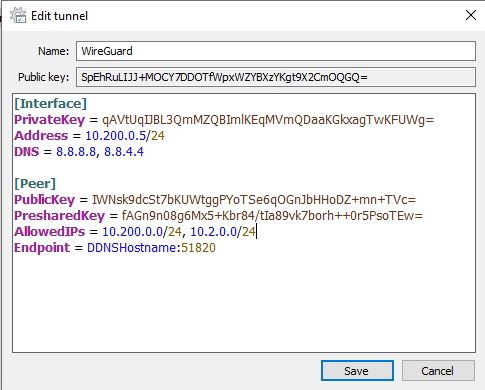
In WireGuard, a split tunnel VPN is usually controlled by the AllowedIPs field. If AllowedIPs is set to something like this:
10.200.0.0/24, 10.2.0.0/24then only traffic destined for those subnets will go through the VPN tunnel. Everything else will use the local internet connection.
In the example below, the WireGuard split tunnel VPN is configured on pfSense, and only the specific internal subnets are routed through the tunnel.
Split Tunnel VPN Pros
- Normal internet traffic does not have to route through the VPN server.
- Performance is usually better for general browsing, streaming, and downloads.
- It uses less upload bandwidth on the network hosting the VPN server.
- It is usually the best option when you only need access to internal resources.
- Your public IP address remains the IP address of the network you are currently connected to.
Split Tunnel VPN Cons
- It does not protect all traffic when you are on an untrusted network.
- You have to define which subnets or IP ranges should use the VPN.
- If the internal networks change, the VPN configuration may need to be updated.
- It can be confusing if DNS is not configured properly.
When I Would Use a Full Tunnel VPN
I would use a full tunnel VPN when the goal is to route everything through the VPN server.
This is useful if you are on a network you do not fully trust, like hotel Wi-Fi, airport Wi-Fi, public Wi-Fi, or a guest network. Instead of only sending internal traffic through the VPN, all traffic goes through the VPN tunnel.
A full tunnel VPN can also be useful if you want your traffic to appear as if it is coming from your home or business network. For example, if your VPN server is hosted at home, your external IP address while connected to the VPN will be your home IP address.
The tradeoff is performance. If you are connected to a full tunnel VPN, your traffic has to travel through the VPN server first. That means your browsing speed depends on the VPN server’s internet upload speed, the client’s internet connection, routing between the two networks, and the VPN protocol itself.
Full Tunnel VPN Example
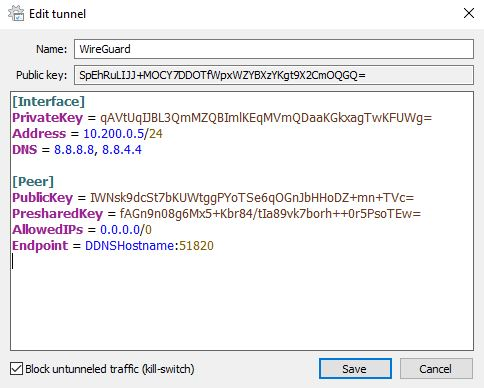
In WireGuard, a full tunnel VPN generally uses this AllowedIPs value:
0.0.0.0/0That tells WireGuard to route all IPv4 traffic through the VPN tunnel. If IPv6 is being used, you may also see:
::/0In the example below, the WireGuard full tunnel VPN is configured on pfSense, and all traffic is routed through the VPN.
Full Tunnel VPN Pros
- All traffic is routed through the VPN tunnel.
- It is better when you are on an untrusted network.
- Your public IP address becomes the IP address of the VPN server location.
- You do not have to maintain a list of internal subnets for routing.
- It is usually easier to understand from a traffic-flow perspective.
Full Tunnel VPN Cons
- General internet performance is usually slower.
- All client traffic uses bandwidth on the VPN server’s network.
- If the VPN server has slow upload speed, the client experience will suffer.
- Some services may behave differently because your traffic appears to come from the VPN server’s location.
- It may be unnecessary if you only need access to a few internal devices.
Split Tunnel vs Full Tunnel VPN: What Actually Changes?
The main difference is the default route.
With split tunneling, your device keeps using the local network for normal internet traffic and only sends specific private networks through the VPN.
With full tunneling, the VPN becomes the default route, so all internet traffic goes through the VPN server first.
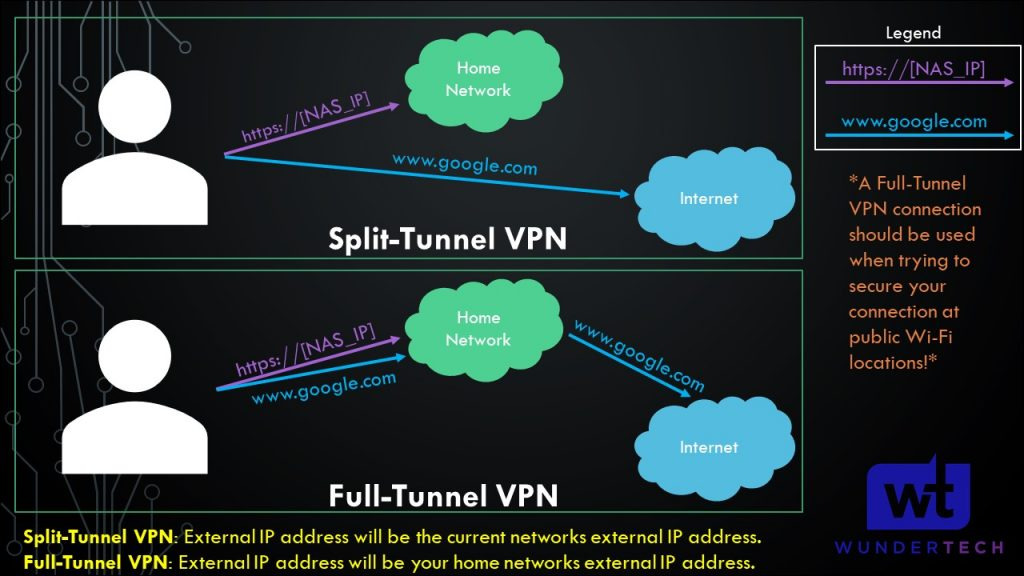
This is why split tunnel VPNs usually feel faster for normal browsing. Your device is not sending every website, app, or streaming service through the VPN. It only uses the VPN when the destination is one of the networks you configured.
Full tunnel VPNs are usually better when security and privacy on the current network matter more than performance.
Which One Should You Use?
For most home lab users, I would set up both if possible.
Use a split tunnel VPN when you are on a trusted network and only need access to internal services like a NAS, Proxmox server, Home Assistant, Blue Iris, UniFi, or a file share.
Use a full tunnel VPN when you are on a network you do not trust and want all traffic routed through your home or business network.
If you only want one configuration, this is how I’d decide:
- Use split tunnel if your main goal is remote access to internal devices.
- Use full tunnel if your main goal is securing traffic on public or untrusted Wi-Fi.
Most people who are setting up a VPN for home lab access will probably be happier with split tunneling. It is faster, cleaner, and avoids routing unnecessary traffic through the VPN server.
But if you travel a lot, use public Wi-Fi often, or want your traffic to exit from your home/business network, full tunnel is worth having available.
DNS Matters Too
One thing that gets overlooked with split-tunnel and full-tunnel VPNs is DNS. Routing the traffic is only part of the configuration. You also need DNS to resolve the names you actually want to use.
For example, if you connect to a split tunnel VPN and try to access nas.local or an internal domain name, that name might not resolve unless your VPN client is using the correct DNS server.
For split tunnel VPNs, I usually only want internal DNS queries to go to the internal DNS server. For full tunnel VPNs, it often makes sense to use the VPN-side DNS server for everything.
The exact configuration depends on the VPN platform, but if the VPN connects and you cannot access devices by hostname, DNS is one of the first things I’d check.
What I Would Avoid
There are a few common mistakes I would avoid when setting up either type of VPN:
- Do not use a full tunnel VPN if your home upload speed is too slow. The client’s internet experience will depend heavily on the VPN server’s upload speed.
- Do not assume split tunnel protects everything. It only protects the traffic that actually goes through the VPN.
- Do not forget DNS. A lot of VPN “it connects but nothing works” issues are actually DNS or routing issues.
- Do not expose services with port forwarding if a VPN solves the problem. VPN access is usually cleaner for private services.
- Do not configure AllowedIPs blindly. In WireGuard especially, AllowedIPs controls routing, so it matters.
- Do not skip testing on a different network. Testing from inside your own LAN does not prove the VPN works correctly from outside.
Final Thoughts
Split tunnel and full tunnel VPNs are both useful, but they solve different problems.
A split tunnel VPN is usually best when you only need access to specific internal devices or networks. It is faster for normal internet use and avoids routing unnecessary traffic through the VPN server.
A full tunnel VPN is usually best when you are on an untrusted network and want all traffic routed through your VPN server. It provides a cleaner security model, but it can be slower and uses more bandwidth on the VPN server’s network.
My preference is to configure both if your firewall or VPN platform supports it. Use split tunnel for normal remote access, and use full tunnel when you want all traffic protected through the VPN.