
Frigate vs Blue Iris comes down to the platform you want to maintain and how closely the NVR needs to connect with Home Assistant. Choose Frigate if Docker, Linux, and a dedicated Home Assistant integration are the priority, while Blue Iris makes more sense if you want a Windows-first NVR with a traditional desktop interface and its own recording tools.
That split matters more than it did in the old version of this comparison. Current Frigate can create a basic configuration and add cameras through its interface, while Blue Iris version 6 now includes built-in AI. A Blue Iris vs Frigate decision is no longer as simple as GUI versus YAML or external AI versus local detection.
Disclosure: Some links below are affiliate links, which means that I earn a percentage of each sale at no cost to you. Thank you for your support.
Frigate vs Blue Iris: Quick Verdict
For most Home Assistant users who already have a Docker or Linux host, Frigate is the better fit because its official integration exposes cameras, recordings, snapshots, sensors, and motion entities inside Home Assistant. Blue Iris is the better fit for someone who wants to manage cameras, recording, alerts, and storage through a Windows application, especially if Windows is already part of the home lab.
| Decision | Frigate | Blue Iris |
|---|---|---|
| Primary platform | Docker/Linux or a Home Assistant App | Windows-first application |
| Camera setup | Basic config plus an Add Camera wizard; advanced settings still matter | Desktop configuration dialogs and per-camera settings |
| AI path | CPU and supported detector hardware, with video acceleration configured separately | Built-in AI in version 6, with external CodeProject.AI available for other deployments |
| Home Assistant | Dedicated integration with MQTT required for many entities | Camera feeds and custom notification routes rather than an equivalent dedicated integration |
| Best fit | Home Assistant and Linux users who are comfortable planning hardware access | Windows users who want a traditional NVR management interface |
The platform decision eliminates one option quickly for most people. If you don’t want a Windows system running the NVR, Frigate is the practical choice. If you don’t want to manage Docker, hardware access, and more detailed configuration, Blue Iris is the easier direction.
Platform, Setup, and Hardware Requirements
Frigate runs as a Docker container or a Home Assistant App, and its current installation documentation recommends Docker on a bare-metal Debian-based host for the best experience. You can virtualize it, but passing a GPU or detector through a virtual machine adds another layer that has to work correctly, so settle the host and accelerator plan before configuring cameras.

The setup process has improved since this comparison was first published. Frigate’s current getting-started guide says it creates a basic configuration automatically, and cameras can be added through Settings > Global configuration > Camera management > Add Camera. YAML is still useful for streams, retention, detectors, hardware access, and other detailed settings. However, it isn’t accurate to say that every camera must now be created by editing a file.

Blue Iris version 6 takes the opposite approach. It’s a 64-bit application for Windows 10 or newer, it can run as a Windows service, and camera settings are handled through the application rather than a Docker configuration. The number of choices can still be overwhelming at first, but the settings are visible in one desktop interface and the product supports up to 128 cameras.
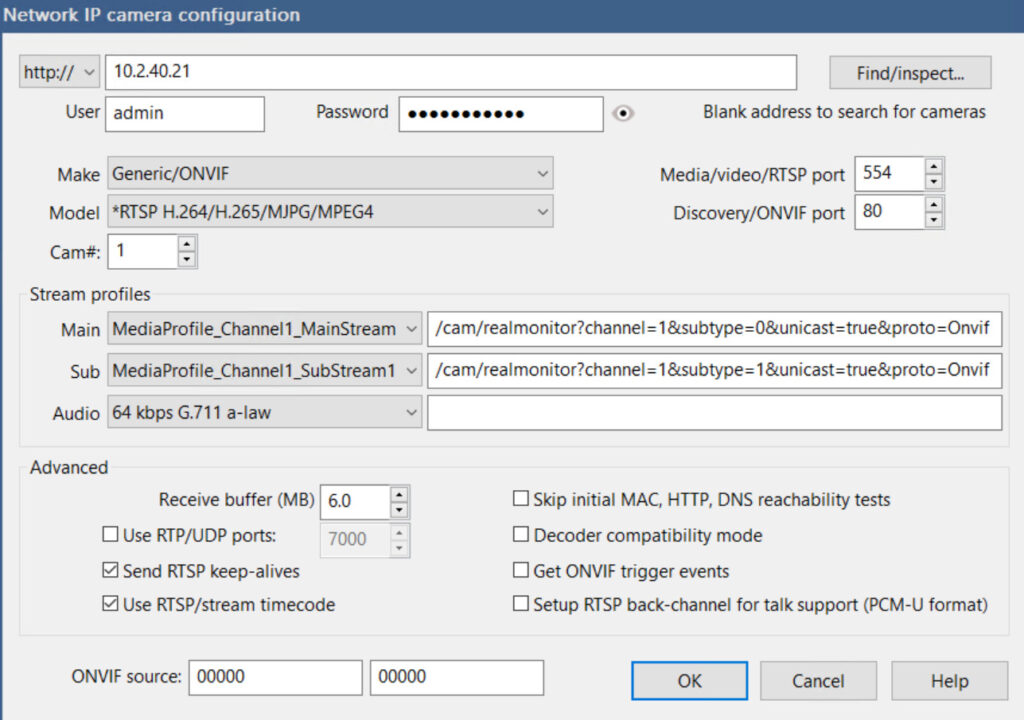
In April 2023, I ran Blue Iris inside a Windows 10 virtual machine on Proxmox, and it worked well for me. That’s a useful example of how flexible a Windows-first NVR can be. However, it also means maintaining the Windows VM, its updates, and the hardware assigned to it, while Frigate generally fits more naturally on an existing Linux or Home Assistant host.
AI Detection and Home Assistant Integration
Frigate’s current getting-started configuration defaults to a CPU OpenVINO detector, so a Coral isn’t required just to get the system running. Supported detector choices also include a Google Coral and Hailo modules, while dedicated hardware can reduce inference latency and CPU load. Detection hardware is only part of the plan, because video decoding has its own acceleration settings and can use supported Intel, AMD, Nvidia, Raspberry Pi, Jetson, or Rockchip hardware.
Coral is still supported, but Frigate does not recommend it for a new installation unless power requirements are particularly low or the host cannot use another AI accelerator. Check Frigate’s current hardware guidance before buying one.
Blue Iris version 6 now has built-in AI that the manual describes as a replacement for external AI processing. The current product site still documents CodeProject.AI as an external server option and identifies DeepStack as the older path, so the correct answer depends on the Blue Iris version and how the system is configured.
In January 2025, I used CodeProject.AI with Blue Iris for motion alerts, but that external-AI setup does not establish how Blue Iris 6’s built-in AI compares with Frigate today.
Home Assistant is where Frigate has the clearer advantage. Its official integration exposes camera, image, sensor, switch, and motion entities, along with recordings and snapshots in Media Browser, although many of those entities require Home Assistant and Frigate to use the same MQTT broker. The Frigate integration with Home Assistant guide covers the setup in more detail.
Blue Iris camera feeds can be added through Home Assistant’s MJPEG integration, and custom event automations are possible, but that isn’t the same product path as Frigate’s dedicated integration. In 2025, I had previously routed Blue Iris motion notifications in Home Assistant through MQTT, then moved my alerts directly from Blue Iris to ntfy because I found that simpler and faster for my setup. That motion notification setup was great for me, but it also shows the customization Blue Iris can require when the built-in workflow isn’t what you want.
Recording, Cameras, and Daily Management
Both products can record continuously and preserve event-based footage, but the controls reflect their different designs. Frigate records directly from the camera stream without re-encoding. Each camera can have separate retention rules for continuous footage, motion, alerts, and detections, while exports are retained separately from those recording rules.
Blue Iris supports continuous, periodic, motion-triggered, and audio-triggered recording, with clips, alerts, a timeline, storage folders, and alert actions managed inside the application. If you want a traditional NVR interface where recording and camera management live together, this is one of the strongest reasons to choose it. Frigate’s event model makes more sense when detections will drive Home Assistant automations.
For a Home Assistant setup, Frigate can spread the work across its interface, configuration, MQTT, Home Assistant, and the host’s hardware access. Blue Iris keeps more camera and recording controls in Windows, but it still may need custom alert actions or external services. Camera software, integrations, and exposure settings change over time, and no security setup is guaranteed.
Frigate NVR Cost and Blue Iris Licensing
Frigate NVR cost starts with free, open-source software, but you still need a host, storage, and suitable hardware. Frigate+ is an optional subscription for models trained on images submitted from your cameras. An active subscription includes a limited number of training requests each year plus access to new base models. Previously trained and cached models continue working after the subscription ends, but requesting new training or downloading new versions requires an active subscription.
Blue Iris is paid software with a full license and a one-camera LE license. The initial purchase includes one year of basic maintenance. Maintenance can be renewed for continued updates, so the ongoing decision is whether the newer releases and support are worth renewing for your installation.
Cost shouldn’t decide this by itself. Frigate can require more planning around the host and acceleration. Blue Iris needs a Windows system and has its own license and maintenance structure, so compare the complete NVR you will operate rather than one software line item.
Frigate or Blue Iris: Which Should You Choose?
Choose Frigate if you already run Docker or Home Assistant, want the dedicated Home Assistant integration, and are comfortable matching the detector, video acceleration, and configuration to your hardware. It’s the better choice for a Linux-first home lab where camera events are going to become part of automations.
Choose Blue Iris if you want a Windows-first NVR and prefer a traditional desktop interface for cameras and recordings. It’s also the better fit if you don’t mind customizing alerts when the default alerts don’t match what you need. My 2023 Proxmox VM and 2025 notification setup worked well, but they don’t prove that the same design is right for every home lab today.
Frigate is a direct Blue Iris alternative for the first group. If neither fits, the broader Blue Iris alternatives guide covers the other options.
For a Frigate NVR vs Blue Iris decision, pick the platform you actually want to maintain every day, because that will matter far more than a feature you might never configure.