Tailscale and WireGuard are often compared like they are two completely separate VPN protocols, but that is not really the right way to look at it. Tailscale uses WireGuard under the hood. The real difference is that WireGuard is the VPN protocol itself, while Tailscale builds an easier management, authentication, and device-access layer on top of WireGuard.
So if you just want the quick answer: I would use Tailscale if you want the easiest setup or cannot port forward. I would use WireGuard directly if you want maximum control, better performance, and a fully self-hosted VPN.
I’ve used both across home lab and remote-access setups, and I don’t think one is automatically better for everyone. Tailscale is easier. WireGuard is cleaner if you’re comfortable managing the VPN yourself. The right choice depends on whether you care more about simplicity or control.
Tailscale vs WireGuard: Quick Answer
This is how I would decide:
- Use Tailscale if you want the easiest setup, do not want to port forward, are behind CGNAT, or want simple device-to-device access.
- Use WireGuard if you want a fully self-hosted VPN, do not want to rely on a third-party control plane, and are comfortable managing keys, peers, ports, and firewall rules.
For most beginners, Tailscale is easier to get working. For people who already run pfSense, OPNsense, UniFi, a Raspberry Pi, or a Linux server and are comfortable with networking, WireGuard is usually the option I’d rather manage long term.
What is Tailscale?
Tailscale is a VPN service that uses WireGuard for the encrypted connections, but makes the setup much easier. Instead of manually creating WireGuard keys, configuring peers, opening firewall ports, and managing client configs, you install Tailscale, sign in, and your device joins your Tailnet.
That is the main reason Tailscale is so popular. It removes a lot of the annoying parts of WireGuard setup.
Tailscale is especially useful if you:
- Cannot port forward because of CGNAT or ISP limitations.
- Do not want to open ports on your router/firewall.
- Want an easy way to access devices across multiple locations.
- Want simple authentication and device management.
- Need subnet routing or exit nodes without manually building everything yourself.
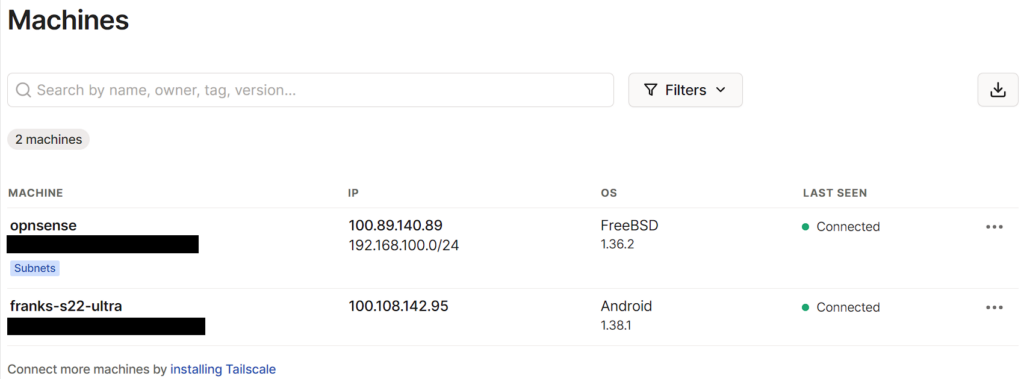
The downside is that Tailscale depends on the Tailscale control plane for authentication and coordination. Your traffic is still encrypted using WireGuard, but Tailscale itself has to be available for devices to authenticate and coordinate connections.
For a lot of people, that tradeoff is completely fine. For others, especially if the goal is to self-host everything and avoid third-party dependencies, WireGuard directly may be the better fit.
What is WireGuard?
WireGuard is the VPN protocol itself. It is fast, lightweight, and much simpler than older VPN options like OpenVPN. You can run WireGuard on pfSense, OPNsense, a Raspberry Pi, Linux, UniFi gateways, and many other platforms.
The main advantage of WireGuard is control. You manage the server, the keys, the peers, the firewall rules, and the routing yourself. That gives you more flexibility, but it also means you are responsible for configuring everything correctly.

I like WireGuard when I’m already managing a firewall or server that supports it. For example, if you already run pfSense, OPNsense, UniFi, or a dedicated Linux server, WireGuard is a very clean way to provide remote access without adding another service on top.
The tradeoff is that WireGuard is more manual. You need to manage public/private keys, client profiles, AllowedIPs, DNS, port forwarding, and firewall rules. None of that is impossible, but it is more work than Tailscale.
Performance: WireGuard is Faster, But That May Not Matter
WireGuard directly is generally faster than Tailscale because there is less overhead. Tailscale uses WireGuard, but it adds extra management and coordination features on top.
In practice, whether you notice the difference depends on what you are doing. If you are accessing a NAS web interface, Home Assistant, Pi-hole, Proxmox, or a few internal services, Tailscale performance is probably fine.
If you are moving large files, doing frequent NAS transfers, streaming from a media server, or using the VPN heavily, I would lean toward WireGuard directly if you can configure it cleanly.
Setup: Tailscale is Much Easier
This is where Tailscale clearly wins. With WireGuard, every client needs keys, peer configuration, AllowedIPs, DNS, and an endpoint. If you are using a firewall like pfSense or OPNsense, you also need firewall rules and possibly NAT depending on whether you are using split tunnel or full tunnel.
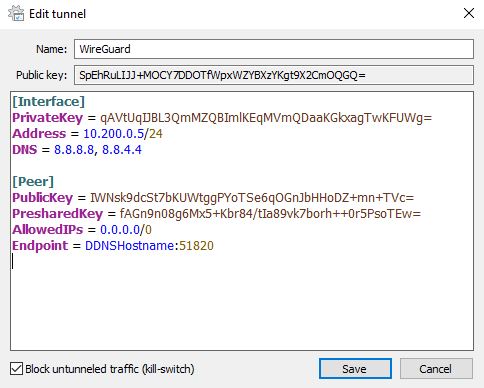
Tailscale is much easier. Install the client, log in, approve the device if needed, and it appears in your Tailscale admin console. From there, you can enable subnet routes, advertise an exit node, or connect directly to other devices in your Tailnet.
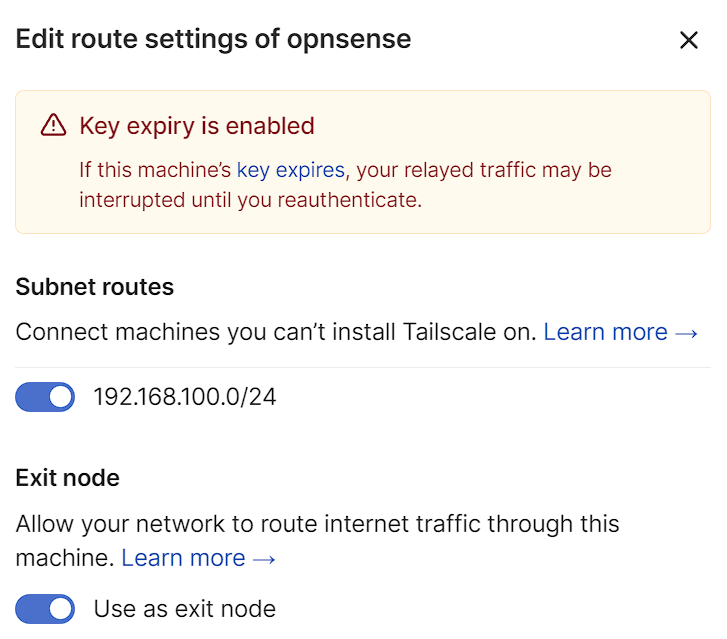
If I were helping someone who just wants remote access and does not care about learning VPN internals, I would probably start them with Tailscale. If they want to understand routing, firewall rules, and VPN design more deeply, I’d have them learn WireGuard.
Port Forwarding and CGNAT
This is one of the biggest practical differences.
WireGuard normally requires a port forward from your router/firewall to the WireGuard server. For example, if you are running WireGuard on pfSense, you need to allow UDP traffic to the WireGuard port on the WAN side.
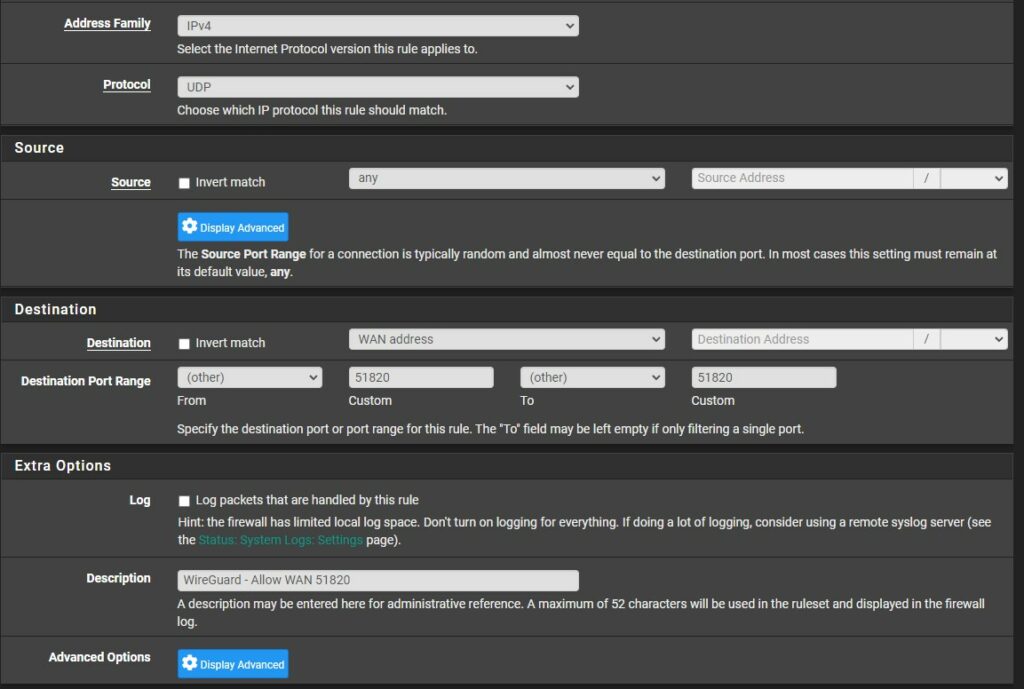
Tailscale does not require traditional port forwarding, which is a huge benefit if you are behind CGNAT, do not control the router, or simply do not want to open ports.
If you cannot port forward, I would not fight it. Use Tailscale. That is one of the situations where Tailscale is clearly the better option.
Split Tunnel and Full Tunnel Support
Both Tailscale and WireGuard can work as split tunnel or full tunnel VPNs.
With a split tunnel, only specific traffic goes through the VPN. This is what I’d use most often for home lab access because you can reach internal services without routing all internet traffic through your home network.
With a full tunnel, all traffic goes through the VPN. This is useful on public Wi-Fi or untrusted networks, but it can be slower because everything depends on the VPN server and your home/business upload speed.
In Tailscale, a full tunnel is generally configured with an exit node. In WireGuard, it is generally controlled by the client’s AllowedIPs value.
For a deeper breakdown, read my split tunnel vs full tunnel VPN guide.
Cost and Licensing
WireGuard is free and open source. You can create as many peers as you want without paying for WireGuard itself.
Tailscale has a free plan for personal use, but the limits and paid-plan details can change over time. Before using it for a business or a larger multi-user setup, check the current Tailscale pricing.
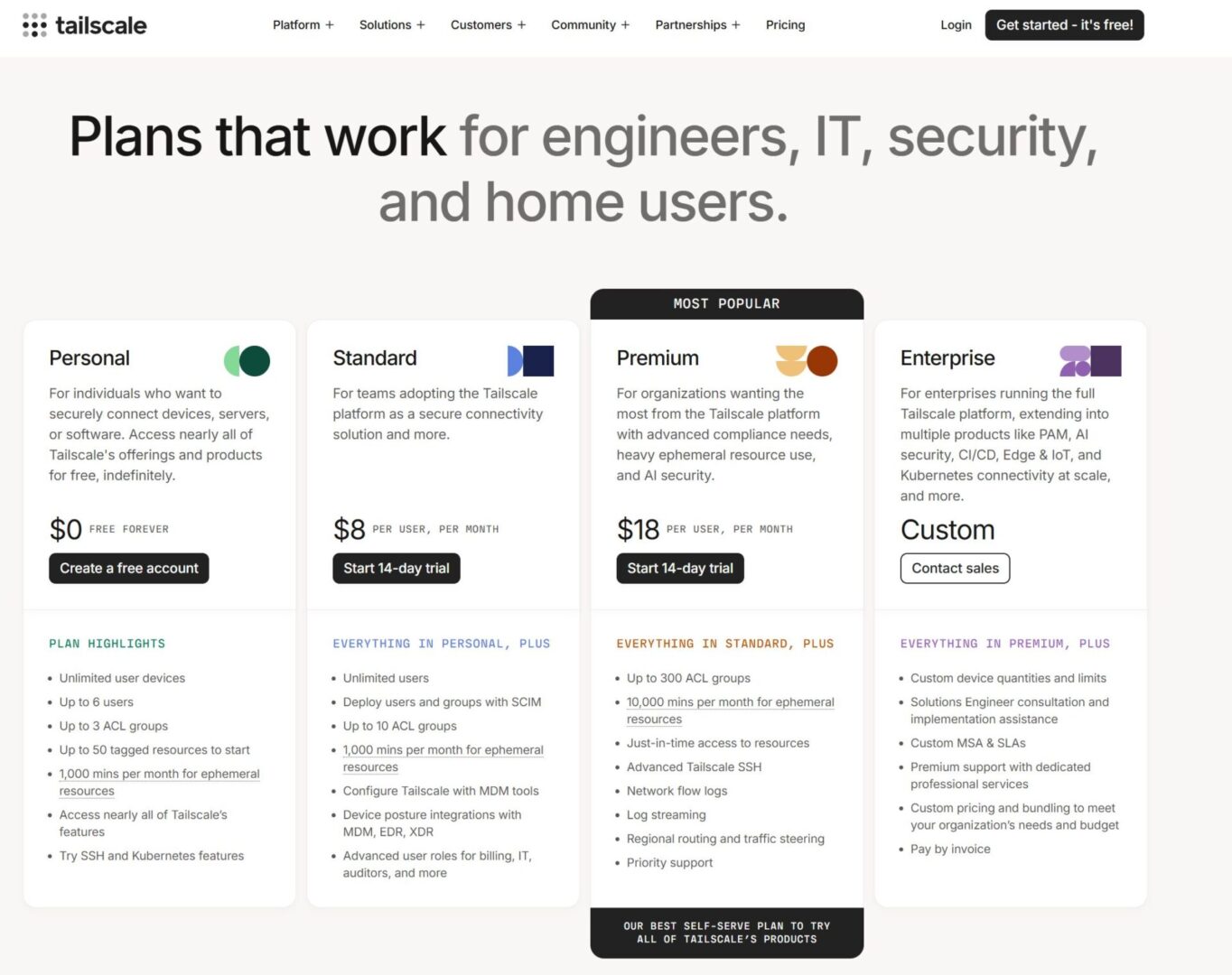
For personal use, Tailscale’s free plan may be more than enough. For business use, WireGuard may be cheaper, but Tailscale may still be worth paying for if it saves time and makes device management easier.
Security and Control
Both options can be secure, but the trust model is different.
With WireGuard directly, you control the server, keys, firewall rules, and routing. There is no Tailscale control plane involved. That is the cleaner option if your goal is to self-host as much as possible.
With Tailscale, the encrypted connections use WireGuard, but identity, authentication, device approval, ACLs, coordination, and management go through Tailscale. That adds convenience, but it also adds a dependency.
That does not make Tailscale bad. For many people, the management layer is the point. It is easier to manage users, devices, subnet routers, and exit nodes through Tailscale than to manually maintain WireGuard peer configs.
Which One Would I Use?
For my own setups, I generally lean toward WireGuard when I want the VPN to be fully under my control and I’m already using a firewall or server that supports it. That is why I like WireGuard on pfSense, UniFi, OPNsense, or a Raspberry Pi.
I would use Tailscale when I want remote access to work quickly, when port forwarding is not possible, when a device is behind CGNAT, or when I want easier multi-device management without manually building every peer relationship.
- Choose Tailscale if you want easy setup, no port forwarding, simple device management, CGNAT support, subnet routing, and exit nodes.
- Choose WireGuard if you want better performance, full self-hosting, direct firewall control, no third-party control plane dependency, and complete routing control.
What I Would Avoid
- Do not choose WireGuard just because it is “better” technically. If you never get it working correctly, Tailscale is the better option.
- Do not choose Tailscale if your main goal is avoiding third-party dependencies. It is easier, but it is not the same as fully self-hosted WireGuard.
- Do not ignore DNS. A lot of VPN issues come down to routing working but hostnames not resolving.
- Do not expose services directly if a VPN solves the problem. Whether you use Tailscale or WireGuard, private access is usually cleaner than port forwarding every internal service.
- Do not assume full tunnel is always better. Split tunnel is usually better for normal home lab access.
- Do not forget backups or documentation. WireGuard keys, peer configs, Tailscale subnet routes, ACLs, and exit node settings should be documented.
Final Thoughts
Tailscale and WireGuard are both great, but they are best for different types of users.
Tailscale is the easiest option. It is what I’d use if I wanted remote access working quickly, did not want to port forward, was dealing with CGNAT, or needed simple device management.
WireGuard is the option I’d use when I want the most control. It is faster, fully self-hosted, and works extremely well on pfSense, OPNsense, UniFi, Raspberry Pi, and Linux servers, but it requires more manual configuration.
If you are new to VPNs, start with Tailscale. If you want to learn how VPN routing actually works, or you already manage your own firewall, learn WireGuard. Both are useful, and in a home lab, there is a good argument for knowing how to use both.